
Speech-To-Text
The Speech-To-Text Transcription tool converts speech from an audio signal into text using OpenAI's Whisper speech recognition model. It accepts a single signal window as input, automatically resamples the audio to 16 kHz, and displays the transcribed text directly in the custom display window.
Requirements
•Julia package: Whisper.jl (Pkg.add("Whisper"))
•A Whisper model file (GGML format) downloaded from https://huggingface.co/ggerganov/whisper.cpp/tree/main
Place the downloaded model file (e.g. ggml-base.bin) in the folder %USERPROFILE%\.whisper_models\. Alternatively, set the environment variable WHISPER_MODEL_DIR to a custom folder path before starting SIGVIEW.
Usage
1.Open or record an audio signal in a Signal window.
2.Create a new Custom Display window and load the WhisperTranscription.jl script.
3.Connect the audio signal window as input.
4.The transcribed text will appear in the display after processing.
Custom Functions
Right-click the window to access model selection:
|
Function |
Description |
|
Set model: tiny |
Fastest processing, lowest accuracy (~75 MB) |
|
Set model: base |
Good balance of speed and accuracy (~142 MB, default) |
|
Set model: small |
Higher accuracy, slower processing (~466 MB) |
|
Set model: medium |
Highest accuracy, slowest processing (~1.5 GB) |
Models with larger sizes produce more accurate transcriptions but require more memory and processing time. The selected model is loaded once and cached until a different model is chosen.
Output
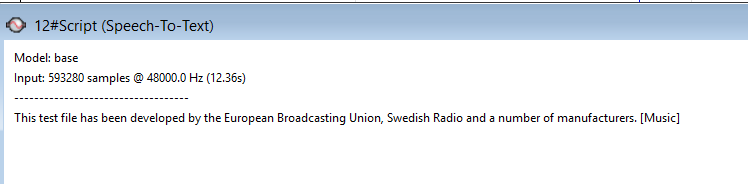
The display shows:
•The currently selected model name
•Input signal information (sample count, sampling rate, duration)
•The transcribed text
Notes
•The input signal is automatically resampled to 16 kHz and normalized, regardless of its original sampling rate.
•Longer audio signals will take more time to process.
•For best results, use clean audio recordings with minimal background noise.
•English-only model variants (e.g. ggml-base.en.bin) can be used by renaming them to the expected filename, or by modifying the script.